Contents Jump to section
The Outlook Issue That Wasn't Outlook: A NetScaler LAS Licensing War Story

Outlook was the first thing people blamed. Fair enough. When Outlook Classic freezes, disconnects, reconnects, and then freezes again, nobody opens the ticket with "please check the load balancer license state".
But that is exactly where this one ended.
The environment was a fairly normal Exchange 2016 setup: two mailbox servers in a DAG, fronted by a NetScaler VPX doing load balancing and SSL termination for the usual suspects. OWA, EAS, EWS, MAPI over HTTP, Autodiscover, OAB, and a few older bits that always seem to hang around longer than planned.
Exchange looked healthy. The DAG looked healthy. Direct access to the servers looked healthy. The Microsoft Health Checker did not throw anything useful at us.
NetScaler, on the other hand, was quietly screaming.
The symptom
Users reported slow mailboxes, Outlook not responding, and random disconnects. Not all the time. Just often enough to make everyone grumpy and to make troubleshooting annoying.
In the NetScaler GUI, the Exchange service group monitors were flapping. A backend would go down, then up again. Then another protocol monitor would do the same dance. Both Exchange servers alternated between UP and DOWN, but they did not collapse together.
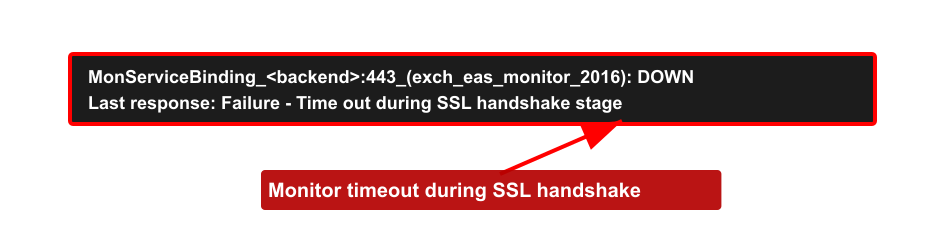
The useful bit was in the monitor tooltip:
Failure - Time out during SSL handshake stageThat message points your brain straight at TLS. Certificate problem? Cipher mismatch? Backend SSL profile? Schannel hardening? All very plausible. Also all wrong, in this case.
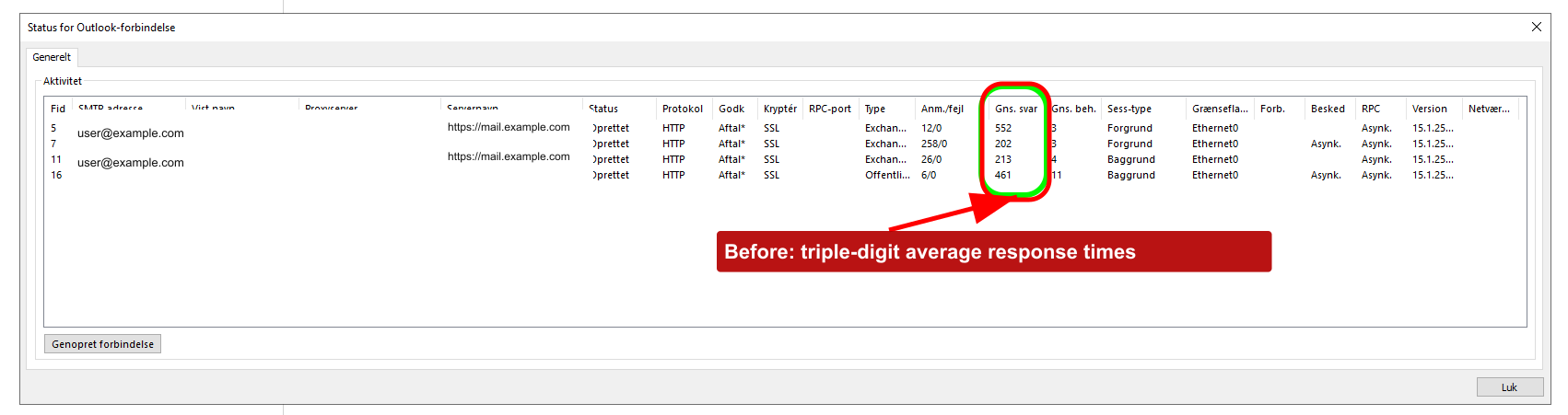
Outlook showed the same pain from the client side. Before the fix, the average response column in the Outlook connection status window was ugly. Triple digits across several sessions.
The obvious suspects
First stop: SSL renegotiation.
There is a known failure mode where hardened Exchange servers and NetScaler backend SSL profiles disagree about renegotiation. If you have disabled insecure renegotiation in Schannel and the NetScaler profile denies renegotiation, Exchange monitors can fail with exactly this sort of SSL handshake timeout. Terence Luk wrote up that scenario years ago, and it is still worth checking.
So we checked the Exchange servers:
$servers = 'MBX01','MBX02'
Invoke-Command -ComputerName $servers -ScriptBlock {
    $path = 'HKLM:\SYSTEM\CurrentControlSet\Control\SecurityProviders\SCHANNEL'
    [PSCustomObject]@{
        Server = $env:COMPUTERNAME
        AllowInsecureRenegoClients = (Get-ItemProperty -Path $path -Name 'AllowInsecureRenegoClients' -ErrorAction SilentlyContinue).AllowInsecureRenegoClients
        AllowInsecureRenegoServers = (Get-ItemProperty -Path $path -Name 'AllowInsecureRenegoServers' -ErrorAction SilentlyContinue).AllowInsecureRenegoServers
    }
} | Format-Table -AutoSize
Those values were not present. Fine. Next rabbit hole.
TLS protocol mismatch was also plausible. The Exchange servers were locked down to TLS 1.2. If the NetScaler backend SSL profile had been stuck in 2014, this would have been an easy explanation. It was not. The profile supported TLS 1.2 and the cipher story checked out.
Then we looked at monitor timeouts. NetScaler HTTPS monitors can be tight if the backend is slow or under load, and increasing a timeout is sometimes the pragmatic fix. But here the backend servers were fine, and stretching the timeout felt like putting a bigger bucket under a leaking pipe. It might hide the symptom, but it would not explain why healthy servers suddenly forgot how to shake hands.
The bit we almost missed
The actual problem was licensing.
During the Citrix move from file-based licensing to License Activation Service, the wider Citrix estate had been handled, but the NetScaler entitlement step had slipped through the cracks. Easy mistake. NetScaler licensing is its own little island, and in multi-product Citrix environments the person fixing Virtual Apps and Desktops licensing is not always the person thinking about ADC capacity.
Citrix documents the change pretty clearly: file-based licensing is end of life on April 15, 2026, and LAS is the activation mechanism going forward for supported NetScaler licensing models. NetScaler also needs to be on a LAS-compatible build, with minimum versions such as 14.1-51.x or 13.1-60.x for normal ADC builds.
In this case, when the old license path stopped doing what the appliance expected, the VPX effectively dropped to a freemium/unlicensed capacity. The box that should have had 1 Gbps available was now constrained like a 10 Mbps appliance.
That changed the whole investigation.
Why a license problem looked like TLS
Most people hear "rate limited" and think "slow". That is only half the story.
NetScaler capacity limits are not polite. When the appliance hits licensed throughput or SSL capacity limits, packets can be dropped. Citrix documents capacity issues such as throughput limit reached, SSL throughput rate limit, and SSL TPS rate limit. CTX225182 is even more blunt: packets can be dropped when the licensed throughput rate is reached.
Now think about what an SSL monitor is doing. It opens a connection and performs a TLS handshake. If a ServerHello, certificate packet, or later handshake packet gets dropped because the appliance is bumping into a capacity cap, the monitor does not know that licensing is the villain. It just sees a handshake that never finishes.
So the monitor reports:
Failure - Time out during SSL handshake stageTechnically true. Deeply misleading.
That also explains why the Exchange servers alternated between UP and DOWN instead of both dying at once. The servers were not the shared failure point. The constrained NetScaler was.
Outlook got caught in the same mess. Outlook Classic talks to Exchange over multiple HTTPS-based connections, including MAPI over HTTP and supporting services such as EWS, Autodiscover, and OAB. Drop enough handshakes or stall enough reconnects and Outlook will do what Outlook does best: sit there looking personally offended.
The fix
The NetScaler entitlement was migrated properly to LAS. Once the license came back and the expected capacity returned, the monitors stabilized within minutes.
No Exchange patch. No certificate replacement. No heroic cipher-suite archaeology.
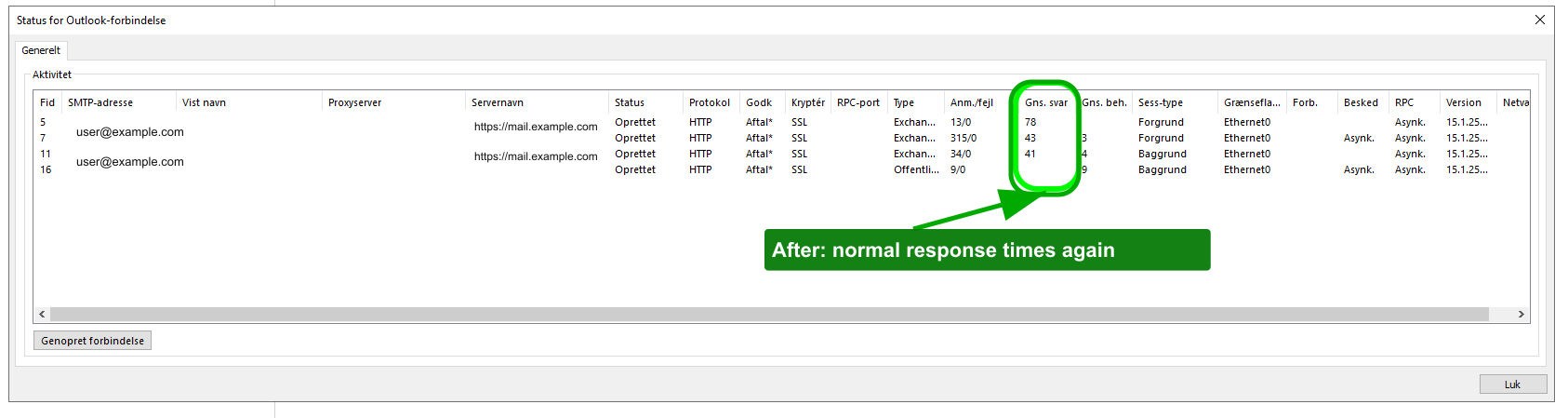
The Outlook client view told the same story after the fix. Average response times dropped back to normal ranges.
What I would check next time
If you see NetScaler Exchange monitors flapping with SSL handshake timeouts, still check TLS. It is a real failure mode. But check licensing early, not after half a day of TLS spelunking.
My short list now looks like this:
- Run
show licenseandshow licenseserverbefore touching SSL profiles. - Check whether the appliance is actually running at the capacity you think you paid for.
- Look for capacity/rate-limit counters, especially SSL throughput and SSL TPS counters.
- Search
ns.logfor licensed throughput messages. - During LAS migrations, track NetScaler separately from the rest of the Citrix estate.
These are also useful when you have NetScaler Console available:
rl_tot_ssl_rl_enforced
rl_tot_ssl_rl_data_limited
rl_tot_ssl_rl_sess_limited
And for old-school log digging:
nsconmsg -K newnslog -d current -g nic_err_rl_pkt_drops -s disptime=1The annoying lesson here is not "licensing breaks things". We all know that. The lesson is that licensing can break things in ways that look exactly like protocol failure.
So if your Exchange servers look clean, your NetScaler monitors flap, and the error says SSL handshake timeout, do yourself a favor: check the license before you start sacrificing goats to Schannel.