Contents Jump to section
Keeping Always On VPN - always on?

UPDATED March 2026 -- This post has been reviewed and updated to reflect current Microsoft product names, portal locations, and technology status. See inline notes for specific changes.
The Problem
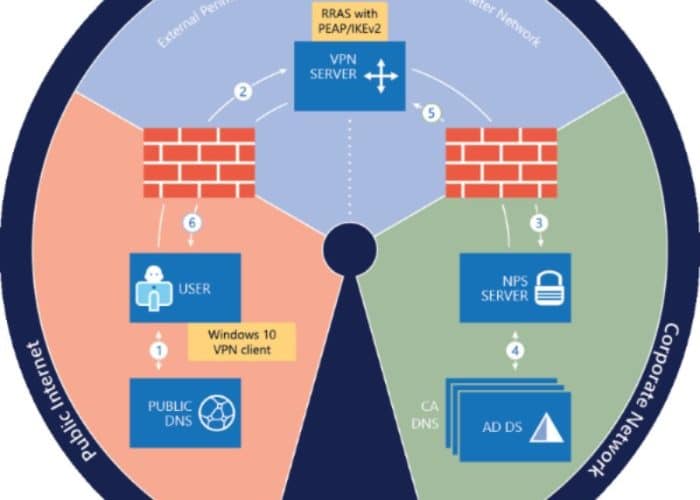
The Microsoft Always On VPN Solution pushed by Microsoft as the successor to DirectAccess is a great tool for remote workers. Despite the name, user tunnel connections don't always auto-connect, even with "AlwaysOn" configured in the ProfileXML or Intune configuration policy.
Some hacks include scheduling the "rasdial" command, but wouldn't you rather know why it stopped auto-connecting?
Why is it not auto connecting?
This might happen because the user manually disconnected the user tunnel, or for unexplained reasons. What happens is the VPN connection gets added to a registry list called AutoTriggerDisabledProfileList.
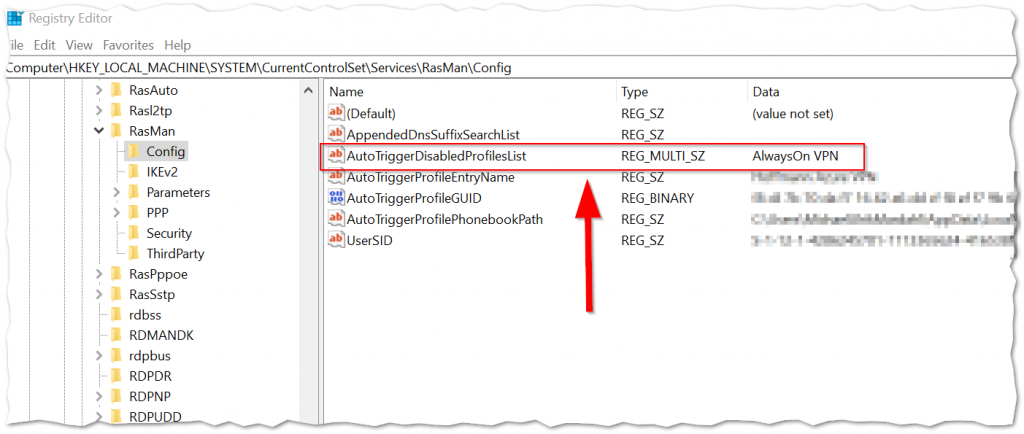
The AutoTriggerDisabledProfileList property is located at:
HKEY_LOCAL_MACHINE\SYSTEM\CurrentControlSet\Services\RasMan\ConfigThis is a REG_MULTI_SZ property that maintains profiles in a disconnected state, surviving reboots.
Can Intune help me fix this?
You could use PowerShell to remove unwanted entries, or create a .intunewin package with a detection rule.
For the detection method:
$connectionName = "Always On VPN Connection Name"
if((Get-ItemProperty -Path HKLM:\SYSTEM\CurrentControlSet\Services\RasMan\Config | select AutoTriggerDisabledProfilesList -ExpandProperty AutoTriggerDisabledProfilesList) -icontains $connectionName){
    Write-Host "Found connection: $connectionName in disabled profile list!"
    exit 1
}
Can I disable the user's ability to disconnect?
Microsoft has a device CSP you can deploy with a custom OMA-URI:
./Device/Vendor/MSFT/VPNv2/{ProfileName}/DisableDisconnectButtonNOTE (Updated 2026): OMA-URI custom profiles remain supported but Microsoft recommends using the Settings Catalog for VPN configuration where possible, as it provides a GUI-based interface and better change tracking. The OMA-URI values below remain valid for settings not yet available in the Settings Catalog.
Remember to include %20 for spaces in your VPN profile name.
Read more about this CSP at: VPNv2 CSP Documentation
Final thoughts
Adding a fix via Intune complements the fact that Intune is the preferred distribution mechanism for Always On VPN profiles. Even though this seems like a bug, it's a feature, and as such it might never end up on the troubleshooting page.