Contents Jump to section
Conditional Access and the woes of being an external user

UPDATED March 2026 -- This post has been reviewed and updated to reflect current Microsoft product names, portal locations, and technology status. See inline notes for specific changes.
The Challenge

Conditional Access and multi-tenancy can be tough on anyone used to "the old ways." As a consultant spending admin time in other tenants, taking my identity with me via Entra ID external user invites is extremely useful.
Entra ID makes this easy by allowing customers to on-board me as an external user through a simple invite, granting permissions, and I'm good to go.
An invited identity is still a separate identity
If your customers require external users to authenticate with MFA (and they should), you'll be prompted to provide extra MFA details for the external user identity.
The experience can be confusing because you see your own tenant's branding during initial logon, making it seem like you're feeding data into your own tenant. On smartphones it's especially hard to distinguish.
Remember: Conditional Access can be evaluated in both tenants simultaneously, and you must pass both.
The real pain comes when you change your smartphone or lose it. If you set up the Authenticator app in another organization, you might need them to activate "Require re-register MFA" to get back in. Not cool.
The Modern Solution (Updated 2026)
Microsoft has significantly improved the external user MFA experience since this post was written. The recommended approach for external users is now:
- Use passkeys (device-bound via Microsoft Authenticator) -- these are tied to your device and work seamlessly across all tenants without per-tenant MFA registration
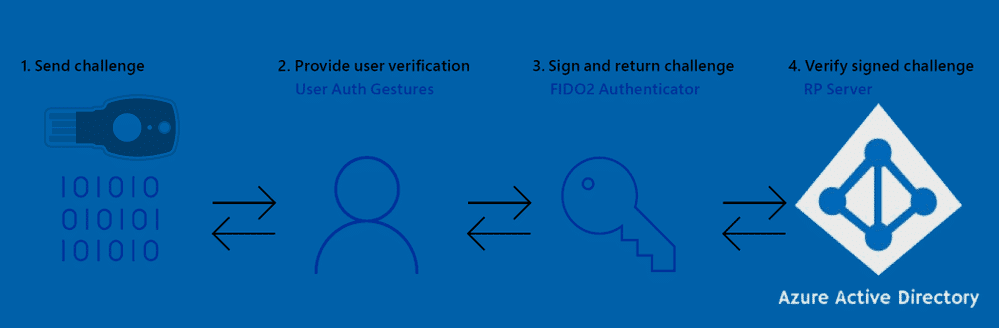
- Use FIDO2 security keys -- register once, use across any tenant that supports external authentication
- Configure cross-tenant access settings in Entra ID to trust MFA claims from the user's home tenant, eliminating the need for re-registration entirely
The cross-tenant access approach is the cleanest solution for organizations that regularly work with the same external partners. See Microsoft's cross-tenant access documentation for setup details.
What to do
The solution is simple:
- Use a FIDO2 key for MFA as an external user
- Or use text message/phone call verification methods when registering for MFA in external tenants (with acknowledged security trade-offs)
There's also the option of excluding Guests and External users from Conditional Access, but that's not recommended for obvious security reasons.
Reference: Microsoft identity access policies for guest access
If you're using Microsoft Teams on mobile, linking the Authenticator app during the enhanced registration process (preview) can be hit-or-miss - sometimes it works, sometimes it doesn't.
Final Words
These are real-world experiences shared for your own evaluation. The multi-tenant external user experience with MFA is an area that still needs improvement.